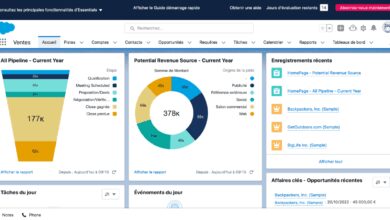
Looking for a smarter way to manage customer relationships? Salesforce CRM isn’t just popular—it’s revolutionary. With unmatched scalability, AI integration, and cloud-based flexibility, it’s the go-to platform for businesses aiming to boost sales, enhance service, and drive growth. Let’s dive into why it leads the pack.


What Is Salesforce CRM and Why It Matters

Salesforce CRM is more than just a customer relationship management tool—it’s a comprehensive ecosystem designed to streamline sales, marketing, customer service, and analytics. Launched in 1999, Salesforce pioneered the cloud-based CRM model, eliminating the need for on-premise software and making enterprise-level tools accessible to businesses of all sizes.
The Evolution of Salesforce CRM
From its humble beginnings as a simple sales automation tool, Salesforce CRM has evolved into a full-stack platform. It now includes modules like Sales Cloud, Service Cloud, Marketing Cloud, Commerce Cloud, and more. This evolution reflects the growing demand for integrated, data-driven customer engagement solutions.
- 1999: Salesforce launches as a cloud-based sales automation tool.
- 2005: Introduces AppExchange, allowing third-party developers to build and sell apps.
- 2016: Launches Einstein AI, embedding artificial intelligence into CRM workflows.
- 2020: Acquires Slack, signaling a shift toward unified communication and collaboration.
“Salesforce didn’t just enter the CRM market—they redefined it.” — Forbes
Core Components of Salesforce CRM
Salesforce CRM is built on a modular architecture, allowing organizations to adopt only the tools they need. The main components include:
- Sales Cloud: Manages leads, opportunities, and sales pipelines.
- Service Cloud: Powers customer support with case management and service consoles.
- Marketing Cloud: Automates email, social, and advertising campaigns.
- Commerce Cloud: Enables personalized shopping experiences.
- Analytics Cloud (Tableau): Delivers real-time dashboards and data insights.
These components integrate seamlessly, ensuring data flows across departments without silos.
Key Features That Make Salesforce CRM a Game-Changer
Salesforce CRM stands out due to its rich feature set, designed to enhance productivity, improve decision-making, and personalize customer interactions. Its cloud-native architecture ensures accessibility, scalability, and continuous innovation.
AI-Powered Insights with Salesforce Einstein
Salesforce Einstein is an AI engine embedded across the platform. It analyzes vast amounts of customer data to deliver predictive insights, automate tasks, and recommend next-best actions.
- Predicts lead conversion probabilities.
- Recommends optimal times to contact prospects.
- Automates case routing in Service Cloud.
For example, Einstein Activity Capture automatically logs emails and calendar events, reducing manual data entry by up to 40%. This not only saves time but also improves data accuracy.
Customization and App Development with Lightning Platform
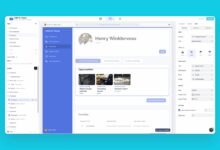
The Lightning Platform allows businesses to customize Salesforce CRM without extensive coding. With drag-and-drop tools, companies can build custom apps, workflows, and dashboards tailored to their unique processes.
- Lightning App Builder: Create custom interfaces.
- Process Builder: Automate complex business processes.
- Flow: Design guided user experiences.
Organizations like Toyota and Adidas use Lightning to build industry-specific solutions, proving its adaptability across sectors.
Seamless Integration with Third-Party Tools
Salesforce CRM integrates with over 3,000 apps via the AppExchange, its official marketplace. Whether it’s syncing with Gmail, connecting to Zoom, or pulling data from Shopify, integration is smooth and secure.
- Marketing teams link Salesforce with Mailchimp or HubSpot.
- Finance departments sync with QuickBooks or NetSuite.
- IT teams use MuleSoft (owned by Salesforce) for enterprise-grade API integration.
This interoperability ensures Salesforce CRM becomes the central hub of a company’s digital ecosystem.
How Salesforce CRM Transforms Sales Teams
Salesforce CRM is often associated with sales automation—and for good reason. It empowers sales teams with tools that enhance productivity, improve forecasting, and shorten sales cycles.
Lead and Opportunity Management
Salesforce CRM provides a centralized database for tracking every lead and opportunity. Sales reps can assign scores, track engagement, and prioritize high-value prospects.
- Automated lead assignment based on geography, product interest, or workload.
- Real-time visibility into pipeline health.
- Customizable stages in the sales process.
According to a Salesforce State of Sales report, teams using CRM tools close 29% more deals than those who don’t.
Sales Forecasting and Analytics
Accurate forecasting is critical for business planning. Salesforce CRM uses historical data, deal stage progression, and AI to generate reliable sales forecasts.
- Forecast categories: Pipeline, Best Case, Commit, Omitted.
- Roll-up forecasts by team, region, or product line.
- Drill-down capabilities for detailed analysis.
Managers can identify bottlenecks early and adjust strategies proactively, reducing revenue surprises.
Mobile Access and Productivity Tools
The Salesforce mobile app ensures reps stay connected whether they’re in the office, at a client site, or on the go. Features include offline access, voice-to-text notes, and calendar sync.
- Update records without internet connectivity.
- Receive real-time notifications on deal changes.
- Access customer history during meetings.
This mobility translates into faster response times and improved customer satisfaction.
Enhancing Customer Service with Salesforce CRM
Exceptional customer service is a competitive advantage. Salesforce CRM’s Service Cloud equips support teams with tools to resolve issues faster, personalize interactions, and measure performance.
Case Management and Omnichannel Support
Service Cloud allows agents to manage customer cases from multiple channels—email, phone, chat, social media, and self-service portals—all within a single interface.
- Automated case routing to the right agent.
- SLA tracking to ensure timely resolution.
- Knowledge base integration for quick answers.
Companies like Amazon Web Services and T-Mobile use Service Cloud to handle millions of support interactions annually.
Self-Service Portals and Communities
Salesforce CRM enables businesses to create branded customer communities where users can find answers, submit cases, and interact with peers.
- Reduces support ticket volume by up to 30%.
- Improves customer satisfaction through 24/7 access.
- Encourages peer-to-peer problem solving.
For example, GE Appliances uses Salesforce Communities to provide troubleshooting guides and firmware updates, enhancing user experience.
Service Analytics and Performance Tracking
Managers can monitor key performance indicators (KPIs) like first response time, resolution time, and customer satisfaction (CSAT) scores.
- Real-time dashboards for team performance.
- AI-driven recommendations for improving service quality.
- Integration with Tableau for advanced reporting.
This data-driven approach helps organizations continuously refine their support strategies.
Salesforce CRM for Marketing: Driving Personalized Campaigns
Marketing Cloud is Salesforce’s powerhouse for digital marketing. It enables businesses to create, execute, and measure personalized campaigns across email, social, mobile, and advertising channels.
Journey Builder for Customer Engagement
Journey Builder allows marketers to design automated, multi-channel customer journeys based on behavior, demographics, and engagement.
- Trigger emails when a user abandons a cart.
- Send personalized offers on birthdays.
- Re-engage inactive subscribers with targeted content.
For instance, a retail brand can use Journey Builder to send a discount code after a customer browses a product three times.
Email Studio and Personalization
Email Studio is a robust tool for creating responsive, branded emails. Combined with Einstein’s predictive content, it delivers hyper-personalized messages.
- Dynamic content blocks based on user preferences.
- A/B testing for subject lines and CTAs.
- Real-time send time optimization.
According to Salesforce Marketing Cloud data, personalized emails generate 6x higher transaction rates.
Social and Advertising Integration
Marketing Cloud integrates with Facebook, Instagram, Google Ads, and Twitter, allowing unified campaign management.
- Monitor brand mentions across social platforms.
- Launch targeted ad campaigns from within Salesforce.
- Track ROI across digital channels.
This integration eliminates data fragmentation and ensures consistent messaging.
Scalability and Security: Why Enterprises Trust Salesforce CRM
One of Salesforce CRM’s biggest strengths is its ability to scale with growing businesses. From startups to Fortune 500 companies, organizations trust Salesforce for its reliability, security, and global infrastructure.
Cloud Architecture and Global Availability
Salesforce runs on a multi-tenant cloud architecture, meaning it serves multiple clients on shared infrastructure while maintaining data isolation. This model reduces costs and ensures high availability.
- Data centers in North America, Europe, Asia, and Australia.
- 99.9% uptime SLA (Service Level Agreement).
- Automatic updates without downtime.
This global footprint makes Salesforce CRM ideal for multinational corporations.
Enterprise-Grade Security and Compliance
Salesforce invests heavily in security, complying with standards like GDPR, HIPAA, SOC 1/2/3, and ISO 27001.
- End-to-end encryption for data at rest and in transit.
- Multi-factor authentication (MFA) and single sign-on (SSO).
- Regular third-party audits and penetration testing.
For regulated industries like healthcare and finance, this level of compliance is non-negotiable.
Custom Roles, Permissions, and Data Governance
Salesforce CRM allows granular control over user access. Admins can define roles, profiles, and permission sets to ensure employees only see the data they need.
- Role hierarchy for data visibility.
- Field-level security to hide sensitive information.
- Data loss prevention (DLP) policies.
This ensures data integrity and reduces the risk of internal breaches.
Implementation and Best Practices for Success
Adopting Salesforce CRM requires more than just technical setup—it demands strategic planning, change management, and continuous optimization.
Phased Rollout Strategy
Instead of a big-bang launch, experts recommend a phased approach:
- Start with Sales Cloud for the sales team.
- Expand to Service Cloud for support teams.
- Introduce Marketing Cloud after data integration is stable.
This minimizes disruption and allows teams to adapt gradually.
User Training and Adoption
Even the best CRM fails if users don’t adopt it. Salesforce offers Trailhead, a free, gamified learning platform with over 2,500 modules.
- Role-based training paths for admins, reps, and developers.
- Certification programs to validate skills.
- Interactive badges and rewards to boost engagement.
Companies that invest in training see up to 50% higher adoption rates.
Ongoing Optimization and Admin Support
Salesforce CRM is not a “set it and forget it” tool. Regular audits, performance tuning, and feedback loops are essential.
- Monthly reviews of dashboard accuracy.
- Quarterly cleanup of duplicate records.
- Annual strategy alignment with business goals.
Dedicated Salesforce admins or consultants can ensure the system evolves with the business.
Real-World Success Stories: Companies Thriving with Salesforce CRM
Across industries, organizations are leveraging Salesforce CRM to drive measurable results. Here are three standout examples:
Unilever: Unified Global CRM
Unilever implemented Salesforce CRM across 100+ countries to standardize sales and service processes. The result? A 30% reduction in onboarding time for new sales reps and improved cross-team collaboration.
Spotify: Personalized Marketing at Scale
Spotify uses Marketing Cloud to deliver personalized playlists and subscription offers. By analyzing user behavior, they increased conversion rates by 25% and reduced churn.
Philips: Transforming Customer Service
Philips deployed Service Cloud to streamline support for its healthcare devices. With AI-powered case routing and self-service portals, they achieved a 40% faster resolution time and higher CSAT scores.
What is Salesforce CRM used for?
Salesforce CRM is used to manage customer relationships across sales, marketing, customer service, and analytics. It helps organizations track interactions, automate processes, personalize communications, and make data-driven decisions to improve customer satisfaction and drive revenue growth.
Is Salesforce CRM difficult to learn?
While Salesforce CRM has a learning curve, its intuitive interface and free learning platform, Trailhead, make it accessible. With structured training, most users can become proficient within weeks. Admins and developers may require deeper technical knowledge, but certifications are available to support skill development.
How much does Salesforce CRM cost?
Salesforce CRM pricing varies by edition and features. Essentials starts at $25/user/month, Professional at $80, Enterprise at $165, and Unlimited at $360. Additional clouds (Marketing, Service) and add-ons increase costs. Volume discounts are available for large teams.
Can Salesforce CRM integrate with other software?
Yes, Salesforce CRM integrates with thousands of apps via the AppExchange and APIs. Popular integrations include Gmail, Outlook, Slack, Zoom, Shopify, QuickBooks, and Microsoft Teams. MuleSoft, a Salesforce subsidiary, enables complex enterprise integrations.
Is Salesforce CRM secure for sensitive data?
Yes, Salesforce CRM is highly secure, with encryption, multi-factor authentication, and compliance with global standards like GDPR and HIPAA. It undergoes regular audits and offers advanced data governance tools, making it trusted by banks, healthcare providers, and governments.
Salesforce CRM has redefined how businesses manage customer relationships. From AI-powered insights to seamless integrations and enterprise-grade security, it offers a complete solution for sales, service, and marketing teams. Whether you’re a startup or a global enterprise, its scalability and innovation make it a powerful ally in the digital age. By focusing on user adoption, strategic implementation, and continuous optimization, organizations can unlock its full potential and stay ahead of the competition.
Further Reading: